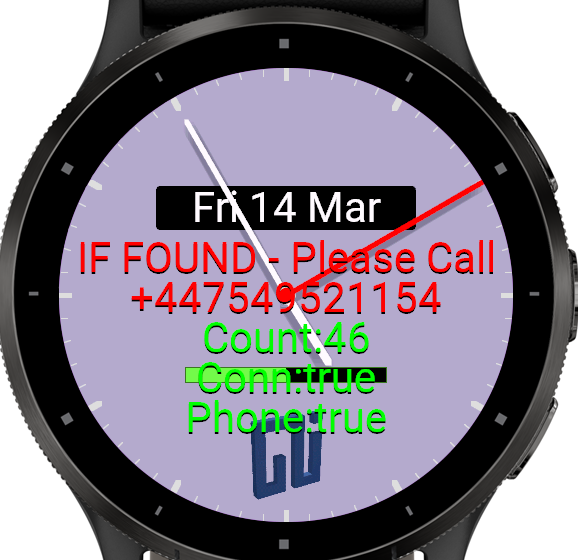
So the other week I went skiing with my wife and kids. Fantastic time, really enjoyed it however on the first day on the first slope I fell when picking up my son's gloves. No biggie, just finding my feet as it's been a while. What I didn't know was I'd lost my Venu2 watch. I loved that watch and very cross that there was literally no way to find it again. I bought a new watch, and spent a few days creating a new watch face with a 'dead mans' switch. I.e. when the heartrate is registered as '0' it shows a message of who to contact to return the watch to.
Pretty pleased with the result and no one else is doing this yet. May try to sell the watch face as it's actually quite useful.
Anyhow, the learning along the way was trying to use Monkey C (Essentially it's javascript with ; everywhere) and did it with the help of chatGPT and Windsurf. Actually surprised chatgpt could help at all and did a reasonable job at making code 'work' but it had no concept of Garmin's libraries and just made it all up. After resorting to using github examples, the AI had given enough to get me started but was a long way from actually working.
It also highlighted that AI isn't there on library indexing just yet and humans, or I, tend to over think things.
For instance I started writing the deadman's switch to work by checking for bluetooth connection to your phone. When this was lost for a prolonged period of time (30 mins) it would show the message. This had multiple issues, firstly the energy requirements for phone watchface made many of the necessary libraries unavailable. Secondly it would be annoying to pop up if you walked away from your phone or had BT off.
I next considered gyrosensors, gps, etc to detect lack of movement. Problem with that is as soon as someone finds it the message disappeared... basically a non-starter of an idea.
After thinking a little more I thought the heart rate sensor could help, at least with the wifi/BT tests I've done already. At that point it dawned on me that the HR sensor is the perfect sensor and is exactly how to detect a lost watch.
So mixing some bluetooth & HR sensor it now shows the message perfectly.
My learning... keep it super simple, do iterations quickly as even the best designed plan shows a better way to do it once the first version is done but you are unlikely to see it until taking that first step in the wrong direction.
Anyhow, if you have a Garmin watch and want the face for free just give me a ping...
Comments
No comments yet.
Sign in to add a comment.